# OmniNX CFW Pack
[](https://git.niklascfw.de/OmniNX/OmniNX/releases)
[](https://git.niklascfw.de/OmniNX/OmniNX/releases)
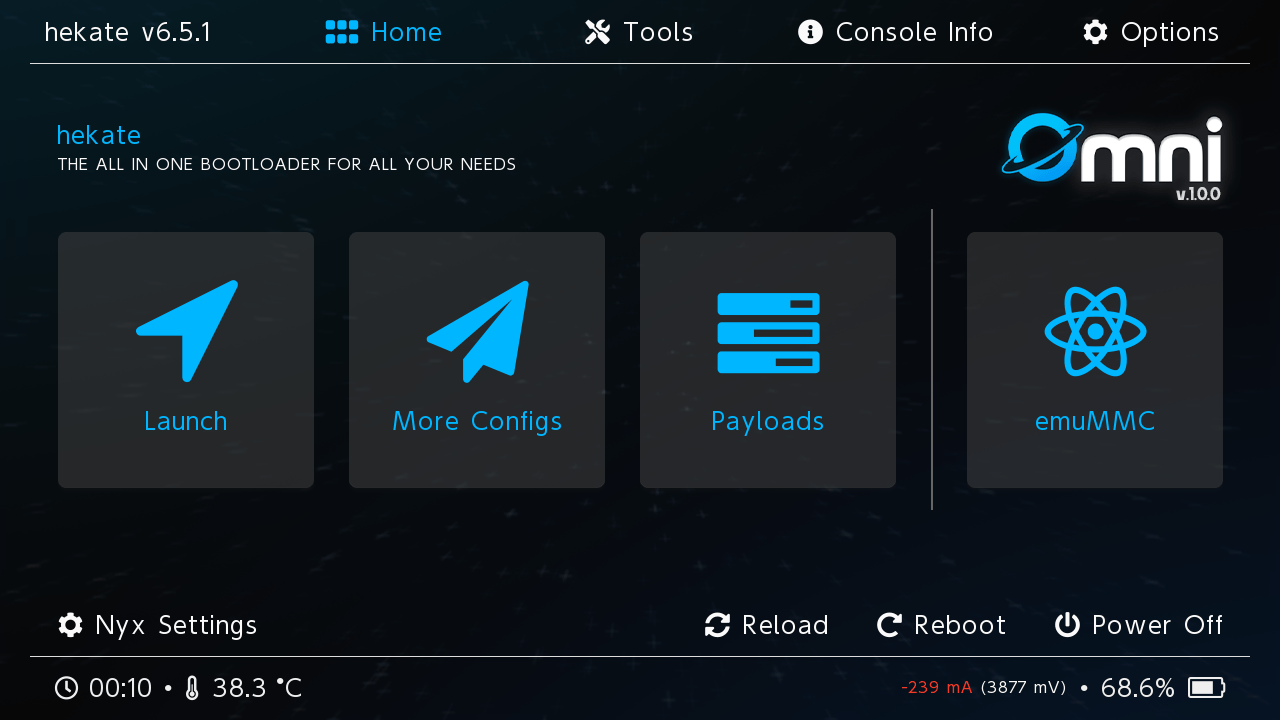
OmniNX ist ein vollständiges Custom-Firmware-Setup für die Nintendo Switch, verfügbar in drei Varianten mit Fokus auf Flexibilität und Modularität.
## Features von OmniNX
* **Drei Varianten** – Standard (voll), Light (minimal) und OC (Overclocking + SaltySD)
* **Vollständiges CFW-Setup** – Sofort einsatzbereit mit Atmosphere, Hekate und wichtigen Tools
* **Modernes Homebrew-Menü** – Sphaira mit OmniNX-Theme und FTP-/MTP-Unterstützung
* **Ultrahand Reload** – Overlay-Menü und Package-System (Alchemist, RAM Patcher, OmniNX Downloader)
* **Vorkonfigurierte Payloads** – Lockpick RCM (Pro), TegraExplorer, Modchip-Toolboxen
* **Sicherheit und Patches** – sys-patch, DNS-MitM, USB 3.0 Force
* **Modulare Struktur** – Build-Skripte für einfaches Erstellen der Packs
* **RAM-Patcher-Packages** – Optionale Speicher-Konfigurationen (Default, RAM Patch, 4GB Kip, etc.)
* **sys-ticon (Standard, damit auch OC)** – Home-Menü: eigene Icons, Titel, Herausgeber und Versionsanzeige ([sys-ticon](https://github.com/masagrator/sys-ticon))
## Varianten
| Variante | Beschreibung |
|----------|---------------|
| **Light** | Minimales Pack: nur Kern-Apps und Overlays (Daybreak, DBI, JKSV, Sphaira, Ultrahand, etc.) |
| **Standard** | Volles Pack: alle Homebrew-Apps, Overlays, Themes und Packages |
| **OC** | Volles Pack plus Overclocking: [Horizon OC](https://github.com/Horizon-OC/Horizon-OC), SaltySD-Integration |
## Inhalt von OmniNX
### **1. Kern-CFW-Komponenten**
1. **[Atmosphere](https://github.com/Atmosphere-NX/Atmosphere)** – Custom Firmware für Nintendo Switch
2. **[Hekate](https://github.com/CTCaer/hekate)** – Bootloader mit grafischer Oberfläche und Nyx
3. **[sys-patch](https://github.com/impeeza/sys-patch)** – System-Patches für unsigned Software
4. **[Ultrahand Reload](https://github.com/ppkantorski/Ultrahand-Overlay)** – Overlay-Menü und Package-System
### **2. Payloads**
* **[Lockpick RCM](https://github.com/saneki/Lockpick_RCM)** – Konsolen-Key-Extraktion
* **[TegraExplorer](https://github.com/suchmememanyskill/TegraExplorer)** – Low-Level-Dateimanager
* **[hwfly_toolbox](https://github.com/hwfly-nx/hwfly-toolbox)** – hwfly-Modchip-Toolbox
* **[Instinct_toolbox](https://github.com/Xnopyt/HWFLY-Instinct)** – Instinct-Modchip-Toolbox
* **[PicoFly_Toolbox](https://github.com/Ansem-SoD/Picofly)** – PicoFly-Modchip-Toolbox
* **[OmniNX Installer](https://github.com/OmniNX/OmniNX-Installer-Payload)** – Pack-Installer-Payload (Staging)
### **3. Homebrew-Apps (Standard / OC; Light hat eine Teilmenge)**
> **Hinweis:** Nicht jede `.nro` liegt direkt im ZIP. Apps wie **Chiaki-ng** oder **Tinwoo** können über den **OmniNX Downloader** nachinstalliert werden (siehe `switch/.packages/OmniNX Downloader/`).
* **[Sphaira](https://github.com/ITotalJustice/sphaira)** – Modernes Homebrew-Menü (Standard-Launcher)
* **[DBI](https://github.com/rashevskyv/DBI)** – Dateimanager, Save-Manager, Installer
* **[Daybreak](https://github.com/Atmosphere-NX/Atmosphere)** – HOS-Update-Tool
* **[JKSV](https://github.com/J-D-K/JKSV)** – Save-Manager
* **[Linkalho](https://github.com/impeeza/linkalho)** – Account-Verknüpfung
* **[Chiaki-ng](https://github.com/streetpea/chiaki-ng)** – PlayStation Remote Play (typischerweise per OmniNX Downloader)
* **[SimpleModDownloader](https://github.com/PoloNX/SimpleModDownloader)** – Mod-Downloader
* **[SimpleModAlchemist](https://github.com/ppkantorski/Alchemist)** – Mod-Manager
* **[Switch Theme Installer](https://github.com/exelix11/SwitchThemeInjector)** – Theme-Installer
* **[ThemezerNX](https://github.com/suchmememanyskill/themezer-nx)** – Themezer-Client
* **[Tinwoo](https://github.com/mrdude2478/Tinwoo-Release)** – Installer (typischerweise per OmniNX Downloader)
* **[NXGallery](https://github.com/iUltimateLP/NXGallery)** – Medien-Galerie
* **[Breeze](https://github.com/tomvita/Breeze-Beta)** – Cheat-Manager
* **[DNS_mitm Tester](https://github.com/meganukebmp/Switch_90DNS_tester)** – DNS-Test-Tool
* **[CyberFoil](https://github.com/luketanti/CyberFoil)** – Installer für NSP, NSZ, XCI, XCZ (Standard)
* **[cheats-updater](https://github.com/HamletDuFromage/switch-cheats-updater)** – Cheat-Pakete aktualisieren (Standard)
### **4. Overlays und Packages**
* **nx-ovlloader** – Overlay-Loader für Tesla-artiges Menü
* **Ultrahand Reload** – Overlay-System und Packages:
- **[Status Monitor](https://github.com/masagrator/Status-Monitor-Overlay)** – Echtzeit-Systemüberwachung
- **sys-patch Overlay** – Patch-Verwaltung
- **EdiZon Overlay** – Cheats
- **sysmodules** – Modul-Verwaltung
- **DNS-MitM Manager** – DNS-Konfiguration
- **QuickNTP** – Zeitsynchronisation
* **RAM Patcher** – Speicher-Konfiguration (Default, RAM Patch, RAM Patch Kip, 4GB Kip)
* **Memory Kit / Memory Config** – Mesosphere- und Speicher-Optionen
* **Alchemist** – pchtxt- und Contents-Verwaltung
* **OmniNX Downloader** – Apps, Overlays, Sysmodules, OS, Updater
* **[sys-ticon](https://github.com/masagrator/sys-ticon)** (Standard; OC-Pack enthält Standard-Inhalt) – Sysmodule für qlaunch: Icons, Titel, Publisher und `display_version` pro Titel-ID (`atmosphere/contents//`, `config.ini`, optional `icon.jpg` / `icon174.jpg`)
* **[Horizon OC](https://github.com/Horizon-OC/Horizon-OC)** (OC-Variante) – Open-Source-Overclocking für Atmosphere (KIP, Overlay, Konfiguration)
* **[FPSLocker](https://github.com/masagrator/FPSLocker)** (OC, Overlay) – FPS-Ziele und Spiel-Patches (mit SaltyNX / NX-FPS)
* **[ReverseNX-RT](https://github.com/masagrator/ReverseNX-RT)** (OC, Overlay) – Docked-/Handheld-Verhalten steuern
### **5. OC: SaltyNX, SaltySD und OmniNX-Tools**
Zusätzlich zum **Standard**-Inhalt liefert die **OC**-Variante u. a.:
* **[SaltyNX](https://github.com/masagrator/SaltyNX)** – Sysmodule für Plugins und Laufzeit-Anpassungen (Grundlage u. a. für FPSLocker)
* **SaltySD** – SD-Pfad für Patches und Plug-ins (z. B. FPSLocker; im Pack u. a. `SaltySD/exceptions.txt`)
* **[PatchExtractor](https://git.niklascfw.de/OmniNX/PatchExtractor)** – entpackt `sd:/SaltySD/plugins/FPSLocker/patches.zip` (Hilfs-Homebrew, siehe Projekt-README)
* **[swr-ini-tool](https://git.niklascfw.de/OmniNX/swr-ini-tool)** – INI-/Konfig-Werkzeug aus dem OmniNX-Projekt
* **[sys-clk](https://github.com/retronx-team/sys-clk)** – **Sys-Clk Manager** (`.nro` im OC-Pack) zur Profil-Verwaltung; unabhängig von den **[Horizon-OC](https://github.com/Horizon-OC/Horizon-OC)**-Tweaks
### **6. Konfiguration und Themes**
* **OmniNX-Theme** – Sphaira-Theme (`/config/sphaira/themes/omninx.ini`) in allen Varianten
* **Boot-Logos** – Einheitliches CFW-Boot-Logo (`bootlogo_cfw.bmp`)
* **Hekate** – Vorkonfigurierte Boot-Einträge (CFW-EmuMMC, OFW, Payloads)
* **Nyx** – Theming und UI (z. B. `themecolor=197`)
### **7. Sicherheit und System**
* **DNS-MitM** – DNS-Weiterleitung und Blocking
* **sys-patch** – Automatische System-Patches
* **USB 3.0 Force** – Verbesserte USB-Performance
* **exosphere.ini** – Optionale Exosphere-Konfiguration pro Variante
## Repository-Struktur
```
OmniNX/
├── badge-data.json # Werte für README-Shields (Switch-FW, Summe Release-ZIP-Downloads auf Gitea)
├── staging/ # Gemeinsame Install-Stage-Dateien (Bootloader, Payloads, Nyx, etc.)
├── variants/ # Varianten-Inhalt
│ ├── light/ # Light-Variante (minimal)
│ ├── standard/ # Standard-Variante (voll)
│ └── oc/ # OC-Variante (Overclocking + SaltySD)
├── scripts/ # Build-Skripte
│ ├── build-all.sh
│ └── build-all.ps1 # Windows PowerShell (optional)
├── VERSION # Version (wird in die Packs eingetragen)
└── output/ # Erstellte ZIP-Archive (wird beim Build erstellt)
```
## Packs bauen
### Voraussetzungen
- **macOS / Linux:** Bash, `zip`
- **Windows (optional):** [PowerShell](https://learn.microsoft.com/powershell/) 5.1+ oder PowerShell 7 (ZIP ohne externes `zip`)
### Alle Varianten bauen
```bash
./scripts/build-all.sh
```
```powershell
.\scripts\build-all.ps1
```
Die Version wird aus der Datei `VERSION` gelesen und in `manifest.ini` sowie die ZIP-Dateinamen übernommen. Die fertigen Packs liegen in `output/`.
## Installation
1. **SD-Karte vorbereiten** – Als FAT32 formatieren
2. **Dateien kopieren** – Gewünschtes Varianten-ZIP auf die SD-Root entpacken
3. **Installation** – Beim start vom Hekate OmniNX Installer Payload auswählen und Anweisungen befolgen
## Verwendung
### Boot-Optionen (Hekate-Launch)
- **CFW-EmuMMC** – Custom Firmware mit EmuMMC
- **OFW** – Original-Firmware
- **TegraExplorer** – Dateisystem-Explorer
- **Lockpick RCM** – Key-Extraktion
### Overlay-Menü
- **L + R + PLUS** – Ultrahand-Reload-Overlay öffnen
### Homebrew-Menü
- **Album** – Sphaira starten (OmniNX-Theme)
## Lizenz
Die verwendeten Projekte unterliegen ihren jeweiligen Lizenzen. Das OmniNX-Pack selbst steht unter der MIT-Lizenz.
**[GPL 2.0](https://github.com/Atmosphere-NX/Atmosphere/blob/master/LICENSE):**
* [Atmosphere](https://github.com/Atmosphere-NX/Atmosphere)
## Credits
* **Atmosphere Team** – Custom Firmware
* **CTCaer** – Hekate Bootloader
* **ppkantorski** – Ultrahand Overlay & sys-clk
* **ITotalJustice** – Sphaira, DNS_mitm Tester, Modchip-Toolboxen und mehr
* **WerWolv** – Tesla-Menü & EdiZon
* **Sthetix** – Lockpick RCM Pro
* **MasaGratoR (masagrator)** – [sys-ticon](https://github.com/masagrator/sys-ticon), [SaltyNX](https://github.com/masagrator/SaltyNX), [FPSLocker](https://github.com/masagrator/FPSLocker), [Status Monitor](https://github.com/masagrator/Status-Monitor-Overlay), [ReverseNX-RT](https://github.com/masagrator/ReverseNX-RT)
* **luketanti** – [CyberFoil](https://github.com/luketanti/CyberFoil)
* **NiklasCFW** & **Woody-NX** – OmniNX-Pack; [PatchExtractor](https://git.niklascfw.de/OmniNX/PatchExtractor), [swr-ini-tool](https://git.niklascfw.de/OmniNX/swr-ini-tool); Vorgänger NiklasCFW Pack
## Support
* **Discord:** [NiklasCFW Modding Community](https://discord.gg/niklascfw)
---
[](https://git.niklascfw.de/OmniNX/OmniNX/releases)
[](https://git.niklascfw.de/OmniNX/OmniNX)